
OUR INDUSTRIES
Technology Solutions Built for Your Industry
Every industry runs on different workflows, users and constraints. SmartEdge IT Solutions shapes digital solutions around how your sector actually works. We start by mapping the real workflows, data and constraints of your sector, then design the solution around them.
Industries we work with
Real Estate
Property businesses lose enquiries in the gap between a website visit, a phone call and a viewing. We build the digital layer that closes that gap, so listings are easy to find, leads reach the right agent, and the follow-up happens without anyone keeping a separate spreadsheet.

Property portal development
Searchable, structured listing platforms with map, filter and saved-search support.
Real estate website design
Project, area and agent presentation that reflects how the market is actually searched.
CRM and lead management
Capture, route, score and follow up enquiries without losing ownership.
Property search and filtering
Location, price, type and amenity filters that narrow results as the visitor types.
Virtual tours and rich media
Photography, floor plans, video and 3D walkthroughs on the listing itself.
Agent and office workflows
Role-based access, shared calendars and enquiry hand-off across a team or a branch network.
Challenges we help address
- Property data that lives in spreadsheets and old exports
- Listing pages that are slow to scan and hard to search
- Enquiries going cold between the website and the agent
- Duplicated effort when several offices run their own site
- Photography and floor plans that never make it online
How buyers and agents actually use a property site
Most property traffic arrives with a specific place and a specific budget already in mind. People open a site on a phone, often while travelling between viewings, and they expect to narrow a search in a few taps rather than browse a grid of thumbnails. That single behaviour has a large effect on the design: filters need to work before results have loaded, saved searches need to be reachable again, and every listing has to be legible at phone width with the price, the area, the number of rooms and a usable photograph.
On the other side, the people operating the site need something quite different. An agent cares about which enquiries are theirs, which ones have been contacted and which are still waiting for a reply. A manager cares about response time and about listings that have gone stale. A marketing team cares about which pages are being found and whether the detail pages are indexable. A single public-facing template rarely serves all three, which is why the internal tools matter as much as the search page.
Where property data usually causes trouble
Property data arrives from several systems at once: an agency management tool, a developer feed, a spreadsheet maintained by hand, and photographs dropped into a folder. The fields rarely line up, addresses are formatted differently in each source, and a unit that was let last month may still be live on the website. Cleaning that is unglamorous work, but it decides whether search returns anything useful.
- Normalise addresses, unit identifiers and status values into one agreed definition
- Decide what happens when a listing is withdrawn, and make sure it leaves the public site immediately
- Keep the agency feed and the website in step so nothing has to be re-entered twice
- Store media against the property record so photographs follow the listing when it moves
What we usually build into the enquiry path
The enquiry path is where most property websites are weakest, so it deserves deliberate design rather than a stock contact form. In our experience the useful pieces are unglamorous: a short structured form that asks only what an agent will actually need, an instant acknowledgement to the enquirer, a copy to the right agent based on area and specialism, and a visible status the enquirer can check. Adding a viewing booking step removes a round of email correspondence that otherwise happens for every appointment.
When an enquiry is not a good fit, saying so early is better than letting it age. A short qualification step, kept to a couple of questions, lets the team route properly and gives the visitor an honest answer instead of silence.
Integrations that tend to matter
- Agency or MLS feeds for listing data, kept in step with a scheduled import
- CRM or helpdesk for enquiry ownership, status and response tracking
- Email and calendar for viewing bookings and automated reminders
- Accounting or payment tools where deposits are collected online
- Map and mapping services for area search and boundary drawing
- Analytics and search console so the pages that bring enquiries can be identified
Security, access and scale
Agent and office tools sit behind authentication, so roles matter: an agent should see their own pipeline, a branch manager should see the branch, and an administrator should manage users without seeing anything they do not need. Sensitive material such as tenancy documents should not sit in a publicly reachable folder, and every upload should be validated by type as well as extension. For growth, the practical constraint is usually search and media rather than the listings themselves: listings paginate cleanly, images are served in responsive sizes, and the cache absorbs traffic on a launch date without a database change.
Getting started
The most useful first conversation is about the enquiry path rather than the website. If you can describe how a viewing is currently booked and where enquiries land, the technical scope follows fairly quickly. We are happy to look at an existing site or feed first and tell you honestly what is worth keeping. You can read more about how we work in our Insights section, or get in touch to arrange a conversation.
How AI can support this industry
- Matching enquiries to comparable, genuinely available properties
- Answering routine listing questions automatically from live data
- Scoring and routing enquiries by likelihood and area
- Flagging listings whose photos or details look incomplete
- Summarising a week of enquiry activity into something a manager can act on

Technology direction
- Laravel
- React
- WordPress
- Node.js
- MySQL
How we deliver
- We map how enquiries actually move today, including the spreadsheets and inboxes in between.
- We model the property, agent, office and enquiry data before drawing any screen.
- We build the search and listing experience around the terms buyers really use.
- We connect the portal to the CRM or inbox the team already works in.
- We test on real devices and real search terms, then hand over documentation and training.
Common questions
Yes. We start from your existing export or feed, clean it, and build the data model around what you have. Replacing the source system is a separate decision and is not required to launch.
Listings are paginated and filtered at the database level rather than loaded in full, so a catalogue of a few hundred or a few hundred thousand behaves the same way for the visitor. That is one of the first things SmartEdge IT Solutions tests on a custom web application build.
Yes. Structure can follow your regions, teams or brands, with permissions and reporting split to match.
It can be migrated page by page so rankings and saved links are preserved, or the new portal can sit alongside it while you move across.
Yes. Each property carries coordinates, so the search runs a spatial query against them and returns the listings inside the boundary the visitor drew. Selecting a locality, a radius or a drawn polygon are all straightforward once that index exists. The harder decision is layout rather than logic, because on a phone the map has to sit behind a list rather than replace it. Our team at SmartEdge IT Solutions settles that with you during our discovery call.
It goes into a queue you control, and the handover into your CRM or inbox is a decision we make with you rather than a default. Options include posting into the system the sales team already uses, assigning by region and agent rota, or sending to an address with the listing details attached. Every enquiry is timestamped so a missed follow-up stays visible, and SmartEdge IT Solutions writes the routing rules down as they stand so they can be changed later.
That depends on how your business is organised. Where agents sit across several offices, we usually build role structure so a user can only edit the listings attached to their branch, with a review step before anything appears publicly. Where a small central team handles everything, the workflow is shorter. The permissions, and who can publish without a second pair of eyes, get agreed as part of the property site specification rather than assumed.
Yes, and it is one of the features that tends to earn its keep. A visitor registers a search, and the site checks new and updated listings against their criteria and sends a notification when there is a genuine match. The detail that matters is deduplication: someone matching three listings should get one message listing all three. Send volume, unsubscribe handling and frequency limits are agreed with SmartEdge IT Solutions before launch, since an over-eager alert system gets switched off and then missed.

Healthcare
Healthcare technology has to be useful to clinicians on a busy day, careful with patient data, and clear for patients who are not technical. We build the digital parts of that balance: booking and enquiry journeys, internal tools that remove administrative work, and patient-facing information that is easy to read and easy to search.

Patient information websites
Clear, accessible service and condition pages written for patients rather than clinicians.
Online booking and scheduling
Appointment requests, reminders and rescheduling without a phone queue.
Referral and enquiry management
Structured intake forms that route to the right team with the detail already captured.
Clinical administration tools
Internal dashboards for records, rota, stock and reporting that replace spreadsheet work.
Telemedicine and remote consultation
Video and messaging journeys that fit around existing clinical governance.
Practice and clinic management systems
Integrations with the record systems already in use rather than a parallel replacement.
Challenges we help address
- Administrative time spent on phone, email and paper instead of care
- Patient information that is hard to read or hard to find
- Enquiries reaching a shared inbox with no owner or status
- Legacy systems that cannot be replaced but must still connect
- Consent, access and audit requirements that shape every design decision
Software rarely fixes a clinical problem on its own
Most healthcare technology projects we are asked to look at are, underneath, an administrative problem. The clinical work is already being done well; what is expensive is the booking phone line, the referral letter that has to be retyped, the reminder call, the report assembled by hand every Friday. Fixing that is usually a smaller and more reliable project than introducing anything new to the clinical side, and it is where the measurable time saving comes from.
It also changes what "done" means. A booking flow is not finished when the form submits; it is finished when the confirmation reaches the patient, the diary is updated, the reminder is scheduled, the cancellation frees the slot, and the patient can rebook without ringing. Writing that whole path down before any code is the single most useful thing we do in the first week.
Patient-facing information has a different job
A condition page, a service description and a pre-appointment form are read by people who are worried, in a hurry, often on a phone, and frequently with a low tolerance for jargon. The writing matters as much as the layout. Short sentences, plain terms, a clear next step, and answers to the questions people actually arrive with. The technical SEO work still applies, but it serves the reader rather than the crawler: headings that reflect real questions, structured data that matches visible content, and no page that exists only to attract a search.
Accessibility is not an optional extra here. A meaningful share of patients use screen readers, browser magnification or voice control, and a booking flow that works for everyone is also a booking flow that finishes more bookings. We test to WCAG 2.2 AA and include keyboard and screen-reader passes in the test plan rather than treating them as a later phase.
Internal tools that remove real work
Internal systems are where the quiet savings accumulate. Dashboards that show today's list, the rota, the outstanding referrals and the stock levels, assembled from data the team already has. Report builders that turn a week of activity into something that can be sent rather than assembled. Single sign-on so staff are not maintaining another set of credentials, and sensible defaults so nobody has to remember a filter combination they use every morning.
- Role-based access so each role sees only what it needs
- An audit trail for who viewed or changed a record, and when
- Data export that the organisation's own privacy process can handle
- Interfaces to existing systems instead of a second source of truth
Integrations worth planning early
- Practice management or clinical record systems, usually through an API or scheduled export
- National or regional referral and booking services where a listing is required
- Payments for deposits, fees and prescriptions
- SMS and email providers for reminders, which are read far more reliably than email alone
- Identity and consent services where a patient's verified identity matters
Security, governance and scale
Healthcare software is held to a different standard than a marketing site, and that shows up in the build. Access is granted by role and reviewed; privileged actions are logged; data in transit and at rest is encrypted; uploads are validated by type as well as extension; and every dependency is kept patched on a schedule rather than when something breaks. Where personal data is processed, the data flows are documented so the organisation's own privacy review has something concrete to read.
Scaling is usually a reporting and export problem before it is a traffic problem. Most internal healthcare tools serve a clinical team rather than the public, so the work is making sure a year of history does not make a screen unusable and that an export completes within the time the team actually has.
Where to start
The right first step is usually the administrative task with the clearest cost. If you can point at a process that consumes staff hours every week, we can tell you what a realistic improvement looks like and whether software is the right answer at all. We write about the practical side of this in our Insights section, and you can start a conversation whenever it suits.
How AI can support this industry
- Summarising clinical notes and referral letters for review by a professional
- Drafting routine patient information in plain language for professional sign-off
- Matching enquiries to the right clinician or service by specialty and availability
- Forecasting demand by day, service and location from booking history
- Flagging incoming information that is incomplete or needs a human check

Technology direction
- Laravel
- React
- Node.js
- MySQL
- Python
How we deliver
- We start with the administrative task that costs the most time, not with a feature list.
- We agree what the software will and will not be responsible for clinically.
- We build against real referral and booking scenarios, with the edge cases written down first.
- We test accessibility, security and the audit trail before anything goes live.
- We document the handover and support the team through the first weeks.
Common questions
Usually, yes. The majority of these projects are an interface layer on top of records that stay where they are, connected through an API, a scheduled export or a file exchange. Replacing the clinical system is a different and much larger decision.
Data is held over TLS, access is granted by role, and every action on a record can be written to an audit trail. Where data leaves your infrastructure we keep that explicit and agreed rather than implied by a third-party integration.
Patient-facing pages are built to WCAG 2.2 AA as a baseline, because the audience includes older people, people using assistive technology and people reading on a poor connection.
We design for auditability, consent and role-based access from the start. Where a decision is clinical it stays with your professionals; the software supports the process rather than making the judgement.
Where the scheduling rules allow it, yes. Availability is read from the system that owns the diary rather than held separately, so the slots offered online are the slots that actually exist. The parts needing agreement first are the rules themselves: how far ahead patients may book, what happens when a clinic cancels, how much notice is required, and whether a referral comes first. Those are administrative and clinical decisions, so SmartEdge IT Solutions implements what you decide rather than choosing for you.
This is where we spend most of the time, because getting it wrong exposes real data and getting it too tight locks people out. The usual shape is a verified email or mobile number at enrolment, a second factor for sensitive actions, and step-up verification before anything that would change a record. Relatives and carers get a separate proxy registration path with its own evidence and expiry. The approach is documented as part of our healthcare project work.
Yes. In practice it is a waiting room, a consent step, the call, and a record afterwards, connected to the clinical record rather than kept in a separate tool. We will also be clear about what the platform does not do for you: consent and clinical notes belong in your system, the video provider is a third party, and the quality of the patient's connection is outside anyone's control. Our team at SmartEdge IT Solutions designs a fallback for a dropped call rather than leaving it to the moment.
That gets settled before any code is written, not afterwards. Data normally stays with the clinical system inside your own infrastructure, and the parts we build hold only what the purpose requires. Where we do host something, the location and the contract terms are written down so your data protection or legal team can check them rather than infer them. SmartEdge IT Solutions never moves data to a third-party service without that being explicit in the written scope.

E-commerce
Online selling is won or lost between the product page and the checkout. We build storefronts, catalogue systems and integrations that stay fast as the range grows, keep payments and stock consistent, and make it straightforward to run a campaign without calling a developer.

Storefront design and build
Product, category and basket journeys designed around how people actually shop.
Catalogue and product data
Structured attributes, variants and content that make search and filtering work.
Checkout and payments
A short, reliable checkout with the payment and payment methods your market uses.
Marketplace and multi-store support
Multiple brands, sellers or regions from one platform.
Order and fulfilment integration
Connection to warehouse, courier and ERP so stock stays accurate.
Performance and conversion work
Core Web Vitals, caching and image delivery tuned for real traffic patterns.
Challenges we help address
- A catalogue that has outgrown the platform it was built on
- Slow pages and a checkout that loses people on mobile
- Stock that disagrees between the website and the warehouse
- Campaigns that require a developer to launch
- Payment, tax and currency handling across multiple markets
The catalogue is the hard part
Storefront projects are usually scoped around the design and underestimated around the data. A range of a few hundred products is straightforward. A range that includes variants, bundles, pack sizes, regional pricing and supplier-specific codes is a data modelling problem wearing a storefront's clothes, and it decides whether search, filtering, stock and checkout work at all.
That is why we model the catalogue before we draw any page. Attributes are defined once, variants inherit from a parent product rather than being duplicated, and supplier feeds are mapped into the agreed structure on arrival. When a new range is added later, the owner adds data rather than editing templates, which is the difference between a store that scales and one that needs a developer every quarter.
Search and discovery decide how much of the range is seen
Most stores show a small fraction of their range through search and category browsing. Typo tolerance, synonyms, faceted filters, correct use of structured data and genuinely fast response times all affect how much of the catalogue becomes reachable. On mobile, where a large share of sessions start, the filter has to work before the results arrive and stay usable with one hand.
Merchandising matters as much as the mechanics. Collections, bundles and recommendation slots are where a range gets browsed, and they need to be editable by the team running the business rather than frozen into a theme.
The checkout is where revenue is decided
Every field, every redirect and every validation rule in checkout is a chance to lose a sale, and each one is also a place where the implementation can be quietly wrong. We build checkout around the payment methods and currencies the market actually uses, keep it as short as the regulations allow, and make failure states recoverable. A shopper who mistypes a card number should be able to correct it, not start again.
- Guest checkout by default, with account creation offered after payment
- Address validation that adapts to the destination country
- Payment methods matched to the market, with local options where they matter
- Tax, duty and shipping calculated before the customer reaches the payment step
- Clear delivery estimates, because surprise costs are a common cause of abandonment
Operations are part of the storefront
Stock accuracy, order routing and returns are not back-office concerns; they are what the customer experiences. The storefront should read from one system of record rather than keeping a second opinion, and orders should flow to the warehouse and courier without being re-keyed. Where a warehouse, ERP or 3PL is involved, that integration is designed in the first phase, because retrofitting it after launch is where overselling and lost orders come from.
Performance and search visibility
Storefront performance is a revenue concern. We set budgets for Core Web Vitals, serve responsive images in modern formats, cache the pages that do not change per visitor, and keep the critical path short. The same discipline applies to search visibility: clean category and product URL structure, real product structured data that matches what is on the page, faceted navigation handled so it does not generate an unbounded number of indexable URLs, and canonical handling for products with several variants.
Getting started
A useful first conversation covers the range, the operational systems behind it and the markets you sell into. Those three answers determine almost everything else. We have written about choosing a platform and about storefront performance in the Insights section, and you can tell us what you are working with whenever you are ready.
How AI can support this industry
- Generating and improving product copy and imagery for a large range
- Answering pre-purchase questions from live catalogue data
- Forecasting demand by product, variant and lead time to reduce stockouts
- Grouping and cleaning messy supplier data into consistent product records
- Personalising merchandising without collecting more personal data than necessary

Technology direction
- Laravel
- React
- Node.js
- MySQL
- Shopify
- Magento
How we deliver
- We look at where the current funnel actually loses people, using real numbers where they exist.
- We model the catalogue so variants, bundles and supplier data stop being a source of bugs.
- We build the storefront and the checkout together rather than treating them as separate projects.
- We connect stock, orders and fulfilment before launch, not after the first oversell.
- We hand over a store the team can run, with documentation and training.
Common questions
It depends on how much of the buying experience is genuinely different. A well-configured platform is usually the right answer for a standard catalogue with standard checkout. A custom build earns its cost when the catalogue logic, pricing rules or operational integration are the point of the business. SmartEdge IT Solutions will tell you which side of that line you are on.
Yes. Shopify, Magento and WooCommerce projects are routine for us, including theme work, custom integrations, performance work and headless front ends.
Stock is owned in one place. The storefront reads from the system of record rather than keeping an independent count, and orders decrement it through an integration rather than a scheduled guess.
It depends on the range, the number of markets and the integrations involved. We give a phased plan with a launch date and a scope that can be cut, rather than a single number that quietly assumes nothing goes wrong.
The ones your customers actually use, which for domestic traffic usually means UPI, cards, netbanking and wallets, with cash on delivery only where the product and the margin tolerate it. That decision reaches checkout design, reconciliation and your finance team's routine. Keeping card data out of our systems entirely, through a hosted checkout or a redirect, is the simplest way to keep the compliance surface small, and SmartEdge IT Solutions will say so when it is the sensible route.
We start from the reverse path, because a store with no workable return route generates support calls instead. The questions we need answered are who receives the returned item, how stock goes back, whether a refund is automatic or needs approval, and what happens if the wrong variant arrives. Where your operation already handles this in an order or returns system, our team at SmartEdge IT Solutions connects to that rather than duplicating the logic inside the storefront.
A large catalogue is a data problem before it is a design problem. We agree one template for variants, units, attributes and images, then load the range through a structured feed rather than typing thousands of rows by hand. The storefront reads from that single structured source, so adding a product never means designing a new page. Imagery is the other half: SmartEdge IT Solutions processes uploads for consistent sizes and formats, because oversized photography is what makes product pages slow.
Filtering happens in the database rather than in the browser, and the search index is built around the facets you actually sell on, such as size, colour, price band and brand. That combination keeps response times steady whether you have a few hundred products or a few hundred thousand. The cost sits in getting attributes and index design right at the start, and SmartEdge IT Solutions tests with data close to your real volume rather than a small sample of the catalogue build.

Education
Education organisations run on a mix of academic, administrative and regulatory expectations, often with an existing learning platform that has to keep working. We build the digital layer around it: clearer course and programme information, smoother enrolment and application journeys, and tools that reduce the administrative load on staff.

Course and programme information
Structured pages for programmes, modules and entry requirements that are easy to compare and easy to search.
Application and enrolment journeys
Forms, document upload, status tracking and communication that reduce manual chasing.
Learning platform integration
Connections to the LMS or student record system rather than a second copy of the data.
Student and parent portals
Timetables, results, attendance, fees and messages in one authenticated place.
Staff and admin tools
Enrolment, reporting and content workflows that remove spreadsheet work.
Accessibility and inclusive design
Conforming interfaces, captions, transcripts and alternative formats as standard.
Challenges we help address
- Programme information spread across PDFs, pages and inboxes
- Applications that lose candidates at the point of submission
- Academic and administrative data duplicated between systems
- Parents and students chasing staff for routine updates
- Accessibility obligations that are met late or inconsistently
The website and the learning platform are different jobs
People arrive on a college or provider website to decide whether to apply. They enter the learning platform once they have already applied. Treating those as one system is the usual mistake: it makes the public pages harder to build and the learning platform harder to change. We keep them separate and connect them deliberately, so the public site can be edited by marketing staff while course records, enrolment and grades stay owned by the system that manages them.
The consequence is that we start by asking where each piece of data is created and who is allowed to change it. When that is written down, the interface between the two systems becomes obvious and small, which is much easier to maintain than a shared database neither system owns.
Programme information is a comparison problem
A prospective student is usually choosing between several options and holding several facts in mind at once: entry requirements, duration, mode of study, start dates, fees and where it leads. Presenting that as paragraphs makes comparison hard. Presenting it as structured, consistently labelled fields makes it easy, and lets the same data drive the page, a downloadable factsheet and any internal search.
The writing matters just as much. Programme pages written internally often assume knowledge the reader does not have. Rewriting them for an outside audience, keeping the same facts but changing the order and the vocabulary, is one of the highest-value tasks in an education web project and it needs subject input rather than a copywriter working alone.
Applications lose candidates at predictable points
Most lost applications are not lost because the candidate changed their mind. They are lost because the process was unclear, something failed silently, or the candidate could not tell what happened next. The fixes are unglamorous and effective:
- Tell the applicant exactly what is needed before they start, including formats and file sizes
- Save progress so a long form can be completed over more than one sitting
- Show a real status, not a generic acknowledgement, and send the same information by email
- Allow documents to be uploaded again if something was wrong, without restarting the application
- Route the application to a person, with a named contact and a response time
Serving students, parents and staff from one place
A single authenticated portal can carry timetables, results, attendance, fees and messages, which removes a large amount of routine email. The important detail is that it presents data the student record system already holds rather than keeping a copy. Where a parent or guardian needs a separate view, that is a permission difference on the same data, not a second system.
For staff, the equivalent is usually a content and reporting workflow: who can publish a programme page, what happens to a withdrawn course, how the weekly report is produced, and where the underlying data came from.
Accessibility is part of the brief
Education organisations carry formal accessibility obligations, and the public website is usually where they are most visible to the people who care. Building to WCAG 2.2 AA from the first component is less work than retrofitting, because keyboard support, focus management, contrast and semantic structure are much cheaper to include than to add later. The same work benefits students using captions, transcripts, screen readers or a phone on a slow connection, and it improves search visibility at the same time.
Getting started
Tell us who the site is for, what the learning platform already does, and which journeys are costing the most manual effort. That is usually enough to identify a sensible first phase. We cover the practical side in the Insights section, and you can get in touch to talk it through.
How AI can support this industry
- Answering routine applicant questions from published programme information
- Summarising written work for a teacher to review rather than grading it
- Transcribing and translating teaching material for accessibility
- Grouping and cleaning programme and applicant data
- Highlighting which enquiries need a human response soonest

Technology direction
- Laravel
- React
- Node.js
- MySQL
- WordPress
How we deliver
- We map the applicant or student journey, including every manual step in between.
- We agree what stays in the learning platform and what the new layer adds.
- We build to accessibility requirements from the first component, not at the end.
- We test with real content, including long course names and empty states.
- We train the staff who maintain the content and stay available afterwards.
Common questions
Almost certainly not. These projects are usually an interface layer that presents and captures what the learning platform already holds, connected through an API or a scheduled exchange.
We build to WCAG 2.2 AA as a baseline and test with keyboard navigation and screen readers as part of the test plan. Captions, transcripts and alternative formats are planned in rather than retrofitted.
Yes, where your process requires it, with payment handled by a provider rather than stored by us.
Structure can follow your organisation, with permissions and reporting split to match, and content authored once and reused where that makes sense.
We build it as a step-by-step application rather than one long form, so a candidate can save, return and see which stage they are at. Supporting documents upload against specific requirements with file type and size checks, and staff work through a queue that reflects your process, including who can override a decision. SmartEdge IT Solutions agrees the stages and the evidence required for each during our discovery call, since that is where the real effort sits.
Two models work in practice. Either academic staff author directly in the platform through an editor you control, or a central content team produces material and staff review it. Most institutions end up with a bit of both, so we design one set of templates and permissions that both groups can work within instead of two disconnected systems. Version history is not a luxury here, because an old version of a module is usually still live somewhere and SmartEdge IT Solutions keeps it retrievable on purpose.
The platform handles delivery, timing and marking against a mark scheme your academic team agrees, and results feed back into the learner's record rather than sitting in a spreadsheet. What technology cannot decide is academic policy: how much retaking is allowed, whether a question set can be reused, what happens if a student loses connection mid-paper. Stronger proctoring tools are third-party products with their own terms and privacy implications, so SmartEdge IT Solutions expects a policy decision before they are switched on.
Usually yes, and we treat it as part of the project rather than something that happens after handover. Academic staff need a session on authoring, marking and publishing; administrators need one on permissions, reporting and recovering a mistake. The material is written around your actual processes and recorded so it is there for people who join later. Training sits alongside the delivery approach we use, agreed at the same point as the build plan rather than bolted on at the end.

Travel & Hospitality
Travel businesses sell a date, a room and an experience, and most of the friction sits between the moment someone decides and the moment they pay. We build the booking journey, the site that explains it honestly, and the systems that keep availability, rates and content in step with what is actually being sold.

Booking engine and availability
Room, table, seat or session availability with correct rate and inventory rules.
Property and destination websites
Presentation that matches the standard of the product, with photography doing the work.
Channel and rate management
Keeping direct and partner inventory consistent and avoiding overselling.
Guest communications
Confirmations, pre-arrival information, upsell and post-stay follow-up.
Experience and tour commerce
Selling activities, guides and packages alongside the core booking.
Integrations and middleware
Connections to PMS, channel managers, tour operators and booking engines.
Challenges we help address
- Availability and rates managed in several systems that disagree
- Content and photography that undersells the product
- Direct bookings lost to commission-bearing channels without a reason to book direct
- Enquiries arriving at 2am with no way to answer them
- Seasonality concentrating a year of work into a few weeks
Availability is the product
In most travel businesses the website is not really the product; the inventory is. A page that describes a property beautifully is of no use if the availability it shows is wrong, and an availability calendar that is slightly out of date produces complaints that reach the front desk before they reach the website owner. This is why we treat inventory as the starting point rather than the integration. The site reads from the system that owns availability and rates, and a booking is only confirmed once that system accepts it.
Rate rules matter just as much. Minimum stays, arrival patterns, closed dates, promotional rates and per-channel parity are all things a booking engine has to enforce correctly. We write those rules down with the commercial team before designing the journey, because a rule that is discovered during build usually turns into a special case that nobody maintains afterwards.
Photography and honest description
Travel is one of the few industries where the gap between expectation and reality is a direct driver of complaints and of the review score. Professional photography, accurate room and facility descriptions, clear policies on cancellation and check-in, and honest distance information do more for a conversion rate than any amount of interface work. We treat the content model as part of the build: structured, translatable, and editable by the team who own the property rather than a developer.
The same applies to accessibility. Travellers plan around mobility, sensory and dietary needs in advance, and information that is buried or ambiguous generates avoidable problems before arrival. Publishing it clearly is both better service and better search visibility.
Direct bookings need a reason
Channel managers keep a business connected to the platforms where most travellers start, and that connectivity is not optional. But a direct channel that offers nothing beyond the same room is competing on price against aggregators with a commission to protect. What usually shifts the balance is something the aggregator cannot do: flexible cancellation, a direct upgrade, a clearer arrival experience, or a better answer when something goes wrong at 11pm.
That is a commercial decision before it is a technical one. Our part is to make sure the direct journey is fast, that the policies are stated clearly enough to be trusted, and that the confirmation and pre-arrival information arrive in a way that reduces the number of calls the front desk takes.
Beyond the core booking
- Experience and tour commerce with its own availability and pricing rules
- Package construction combining rooms, transfers, tickets and activities
- Pre-arrival messaging with useful information rather than a generic reminder
- Post-stay follow-up that asks for a review at a sensible moment
- Partner and agent booking with its own access levels and reporting
- Revenue reporting that reconciles against the channel manager rather than restating it
Resilience matters more here than in most industries
A travel site carries a genuinely seasonal load, and a failure during a peak weekend is far more expensive than a failure in February. Caching, a content model that can be updated without a deploy, monitoring on the booking path rather than only the home page, and a plan for what to do when the upstream system is slow are all part of a sensible build. Where availability is read live from a third party, we design for that call being slow or unavailable, so the page degrades to something honest rather than an error.
Getting started
The first conversation is usually about which systems own your inventory today and where they disagree. Once that is clear, the scope of the website becomes much easier to define. We have written about booking journeys and site performance in the Insights section, and you can start a conversation about your own situation.
How AI can support this industry
- Answering pre-booking questions from live availability and policy data
- Recommending rooms, dates or experiences based on stated preferences
- Transcribing and translating reviews and guest communications
- Forecasting occupancy and demand by date, market and room type
- Personalising pre-arrival information for each booking

Technology direction
- Laravel
- React
- Node.js
- MySQL
- Shopify
How we deliver
- We look at how inventory and rates move today, and where they stop agreeing.
- We define the booking rules before designing the journey, because the rules are the product.
- We build the booking path with the payment and confirmation steps integrated, not bolted on.
- We test the full journey on a real device with a real availability window.
- We hand over the content model and training so the team can keep it current.
Common questions
Usually, yes, through the channel manager or the PMS API the business already uses. That keeps one source of truth for availability and rates, which is how SmartEdge IT Solutions avoids a second booking diary that will drift out of step.
The website does not hold its own inventory. Availability and rates are read from the system that owns them, and a booking is only confirmed once that system accepts it.
Yes. Tour and activity commerce has different rules from room inventory, so SmartEdge IT Solutions normally designs it as its own catalogue — experiences sold separately from rooms — with its own availability model rather than a simplified copy of the room rules.
A group of properties can share a platform with per-property content, rates and availability, which is usually easier to run than a separate site per property.
More than it looks like on a diagram. Dates and occupancy go into the availability search, then guests see rooms or rates with the total including taxes, deposits and any city levy, and the cancellation policy in plain words before they commit. Payment is taken as a card authorisation or a deposit depending on the property, and the confirmation has to reach the guest by email and land in the PMS. SmartEdge IT Solutions designs that sequence with your reservation team, because the edge cases are where they lose time.
Direct bookings avoid the commission an OTA takes on each reservation and give you the guest relationship, which matters for repeat business. The catch is that travellers compare the agency price before booking, so rates and availability have to stay consistent across channels, and that consistency is normally handled through your channel manager rather than by hand. SmartEdge IT Solutions will tell you honestly whether your volume justifies a strong direct channel or whether the agencies are doing most of the work for you.
Each location gets a real page with content a traveller would want to read, written around that property's actual situation rather than generated from a template with the city name swapped in, and the same generic page across twenty properties competes with itself. SmartEdge IT Solutions also agrees who maintains that content and the destination guides, since it goes stale without an owner, and sets up reporting on which pages actually bring bookings.
Yes, and it is where a surprising amount of revenue gets left on the table. Parking, transfers, breakfast, spa time and late checkout are offered as optional extras at the booking step, priced next to the room rather than buried on a separate page. Timing matters, since upselling during search or on the confirmation screen converts better than an email a week later. Our team at SmartEdge IT Solutions also checks how your property management system records extras, because one that never reaches the folio is not much use.

Manufacturing
Manufacturing runs on information that already exists somewhere: a job sheet, a machine, a goods-in note, a quality record. Our job is to connect that information into something people can act on, without replacing the systems that already work on the shop floor.

Production and planning tools
Scheduling, capacity and job tracking that reflects how work actually moves.
Quality and compliance systems
Inspection records, non-conformance handling and traceable documentation.
Asset and maintenance management
Planned maintenance, spares and downtime recorded against the right asset.
Supplier and procurement portals
Orders, specifications, delivery confirmation and supplier performance.
Internal reporting and dashboards
Operational numbers in one place instead of a monthly spreadsheet.
Shop-floor interfaces
Robust, simple screens and terminals designed to be usable with gloves on.
Challenges we help address
- Production data held in spreadsheets and whiteboards
- Paper quality records that are hard to search or audit
- Downtime and maintenance tracked reactively rather than planned
- Suppliers working to specifications that live in email
- Reporting that takes days to assemble after the period has closed
The data exists, but not where it is useful
Most manufacturing businesses we meet are not short of information. They are short of information in the right place at the right moment. A job sheet is on the shop floor, the schedule is on a whiteboard, the quality record is in a folder, the maintenance history is in someone's inbox, and the monthly report is assembled by hand from all four. Each of those is fine on its own. The problem is that nobody can answer a simple question without walking round the site and asking three people.
That is where software earns its place. Not by replacing the systems on the floor, but by connecting them so the answer is on a screen. It is a much smaller and lower-risk project than a plant-wide replacement, and it is usually the one that produces a visible change within a quarter.
Designing for the environment, not the office
A screen designed at a desk rarely survives contact with a production area. Interfaces used on the floor need to be operable with gloves, legible under poor lighting, tolerant of a dropped device and quick to use when someone is holding a part in the other hand. That usually means fewer fields, larger targets, clear confirmation and a way to undo a mistake without a supervisor.
Connectivity is the other reality. Large sites have areas where the network is weak or absent, and a workflow that stops working there will be worked around rather than used. Where that applies we design for capture on the device and reliable synchronisation afterwards, so a dropped connection delays data rather than losing it.
Quality and traceability
Quality systems are where the documentation requirements are least forgiving, and where searchability matters most. When a record is a scanned PDF in a shared drive, answering "which batches were affected by this fault" means an afternoon of manual work. When the same record is structured and linked to the batch, the answer is a query.
- Batch and serial identifiers that follow the item from goods-in to despatch
- Inspection results recorded against the job, not against a person who remembers them
- Non-conformance handling with a clear route from detection to resolution
- Supplier certificates attached to the delivery rather than emailed separately
- Retention and access rules that support both customer requirements and internal audit
Maintenance and downtime
Most maintenance systems fail because they are used to record breakdowns rather than to plan work, and a system that only ever records breakdowns tells you very little. Recording planned tasks, consumables and the actual downtime against an asset gives you the history needed to judge whether a replacement is due, which spares to hold, and whether a recurring fault is really a process problem wearing a mechanical disguise.
Where machine monitoring data is available it is worth collecting, but it should complement rather than replace the observation of the person operating the equipment. Data that cannot be reconciled with what the shop floor reports is data nobody will trust.
Integrations and reporting
Connecting to the ERP, the accounting system, supplier portals and machine monitoring is normal work, and the important decision is which system owns which data. When ownership is agreed, the interfaces are small and the reporting is straightforward, because each figure has one authoritative source. We also plan for the failure case: what the business does on a Monday morning when a system is unavailable is as important as what it does on a good day.
Getting started
The most productive first step is usually to spend a day on site and follow one job from order to despatch, noting every place information is written down or lost. That single exercise usually identifies the two or three changes that would matter most. We write about operational software in the Insights section, and you can arrange a conversation to talk it through.
How AI can support this industry
- Forecasting demand and capacity from order history and lead times
- Reading quality and inspection data to surface recurring failure patterns
- Matching supplier deliveries to job requirements before they arrive
- Prioritising maintenance by predicted failure rather than by calendar
- Turning free-text fault reports into structured, searchable records
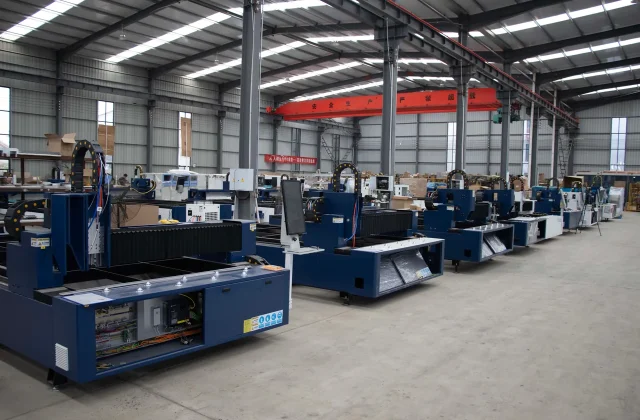
Technology direction
- Laravel
- React
- Node.js
- MySQL
- Python
- .NET
How we deliver
- We start on the shop floor, not in the office, and look at how a job is actually recorded.
- We agree which system stays the source of truth for each piece of data.
- We build the interface to be usable in the environment, including poor light and gloves.
- We test with the people who will use it daily, on the devices they actually have.
- We document the handover, the backup arrangements and what to do when a system is down.
Common questions
No, and in our experience we rarely recommend it. These projects usually connect to the ERP and the shop-floor systems that exist, and SmartEdge IT Solutions adds the reporting and visibility they do not currently provide, rather than replacing a system that already works.
It is often necessary. Where connectivity is unreliable we design for local capture with reliable synchronisation afterwards, rather than assuming a stable network across a large site.
Traceability is built in rather than added later: batch and serial identifiers flow from goods-in through production to despatch, and the record follows the item.
Where the equipment exposes data through a standard protocol we can collect from it. Where it does not, a simple capture at the point of use is often more reliable than an expensive integration.
Results are captured where they are taken, against the batch or serial they belong to, with measured values recorded rather than a pass or fail impression. An out-of-spec result then has to do something: quarantine the batch, raise a non-conformance, block despatch. That link is the part worth designing carefully, because an inspection record that does not affect what can ship next is only paperwork. Whether testing is in-house or at an external lab, SmartEdge IT Solutions models it the same way.
Yes, where it is not already handled by your maintenance system. Preventive schedules are defined per asset and interval, work orders are raised against a machine, and a technician records parts used and time spent so the cost lands on the job instead of in a note. A plant with an existing CMMS gets an integration rather than a duplicate. Where connectivity is uneven on the floor, our team at SmartEdge IT Solutions opens and closes the work order on a handheld and synchronises it afterwards, so the record survives the gap.
A short list, deliberately. Line status, current batch, downtime reason, output against plan and the next maintenance due, laid out for a wall screen or a rugged tablet and readable at a distance in poor light. That works better than a dense dashboard nobody can glance at while walking past, and detail belongs in the reporting layer for whoever analyses the week. Where the line already drives screens from the PLC, our shop floor work feeds those instead of adding hardware.
Request, quote, purchase order, goods receipt and invoice are treated as one flow rather than five separate forms, with the PO sent in whichever way your supplier expects. Prices and terms come from the supplier record, so a goods receipt is checked against what was ordered instead of keyed in from a bill. If your ERP already owns procurement, SmartEdge IT Solutions covers the parts around it, and that boundary is settled during our discovery work rather than midway through the build.

Finance & FinTech
Financial services live or die on trust, accuracy and the ability to explain what a system did. We build the customer-facing journeys, internal tools and integrations that make financial software easier to use and easier to audit, with security and regulatory expectations designed in from the start.

Customer portals and self-service
Accounts, statements, payments and case history in one authenticated place.
Onboarding and identity flows
Straightforward, auditable journeys that satisfy the checks a regulated business has to run.
Payment and transaction systems
Reliable processing with clear reconciliation, retries and exception handling.
Reporting and reconciliation
Figures that tie back to the source system and can be explained line by line.
Internal operations tools
Case management, workflow and audit trails for the teams doing the work.
API and legacy integration
Connecting payment, core banking and reporting systems that were not designed to talk to each other.
Challenges we help address
- Legacy systems that cannot be changed but must still be used
- Reconciliation that takes days because the data does not line up
- Customer journeys that do not explain fees, timing or risk clearly
- Audit and compliance requirements that shape every release
- Third-party and uptime dependencies outside the business's control
Trust is a feature you have to design
People do not check the arithmetic on a bank statement; they check whether it looks right. That means formatting matters as much as the underlying data, that a figure should always be traceable to where it came from, and that an explanation should be available without needing a phone call. In regulated businesses the same principle applies internally: an auditor should be able to see who did what, when, and under which policy, without anyone reconstructing it from memory afterwards.
That combination of visible accuracy and visible control is what separates a financial platform that is trusted from one that is merely used. It is also why we resist shortcuts here. A figure that is approximately right, or an action that cannot be explained after the fact, is a defect in this sector in a way it would not be on a brochure site.
Reconciliation is where the real cost hides
Reconciliation is the least glamorous part of financial operations and usually the most expensive. It fails for predictable reasons: two systems using different time zones, rounding applied at different points, a status that means something different in each, and an exception queue that only a few people understand. Each exception is handled by a person until the backlog becomes structural.
The fix is rarely a new system. It is agreeing one authoritative source per figure, normalising the differences explicitly, and giving the operations team a queue they can work through rather than a report they have to interpret. Where an automated match is proposed, it should be a proposal: shown with the reason it was matched, confirmed by a person, and reversible.
Explaining money clearly
A large share of support volume in financial services comes from questions the interface should have answered: why this amount, why now, what this fee is, what happens if I do nothing. Those answers belong next to the figure, in plain language, available before the customer asks. It reduces contact volume, shortens onboarding, and it is also the accessibility and comprehension work that regulators increasingly expect.
Where documents are involved, the same principle applies. A terms document that is legally accurate and unreadable is not doing its job. Summarising the points that matter, in ordinary language, alongside the full document, is a small piece of design with a large effect on how confident customers feel.
Onboarding and identity
Onboarding is where a regulated business meets a customer who wants to be finished in five minutes. The tension is real: the checks have to be thorough and the experience has to be quick. The way through is usually to ask for identity information once, reuse it, and make the state of the application visible so the customer can see what is still outstanding instead of guessing.
- Progressive disclosure so a customer is not asked for everything at once
- Clear status with a named next step and a realistic time
- Document capture that works on a phone, with re-upload rather than restart
- Decision records that explain the outcome and what to do about it
- Consent capture that is specific, versioned and retrievable
Security, audit and third parties
Financial systems are attacked specifically, so the baseline is higher. We build with role-based access, encryption in transit and at rest, validated uploads by type as well as extension, dependency patching on a schedule, and an audit trail covering both user actions and administrative changes. Sensitive actions get step-up verification rather than relying on an existing session.
Third-party dependencies deserve the same attention as internal code. Payment providers, identity services, screening tools and data suppliers all have availability characteristics we do not control, so the interfaces are designed to fail visibly rather than silently, with clear retry, queue and reconciliation behaviour. Agreeing the escalation path with the operations team before launch is part of the build, not an afterthought.
Getting started
The first useful conversation is about which system owns which figure and how the business currently explains a number to a customer or an auditor. Those two answers define most of the work. We have written about regulated systems and handover in the Insights section, and you can get in touch when it is convenient.
How AI can support this industry
- Drafting explanations of complex documents and terms in plain language
- Classifying and routing support cases to the right team
- Detecting patterns in transaction data that indicate reconciliation breaks
- Assisting analysts with research while leaving every conclusion to a person
- Generating first drafts of regulatory and internal reporting for professional review

Technology direction
- Laravel
- React
- Node.js
- MySQL
- Python
- .NET
How we deliver
- We establish which system is authoritative for each figure before building anything.
- We document the audit and compliance constraints the product has to satisfy.
- We build the reconciliation and exception paths as carefully as the happy path.
- We test against realistic data volumes and failure conditions.
- We hand over with the documentation an auditor or a new developer would expect.
Common questions
Yes, that is the most common shape of this work. We build the interface layer around systems that stay where they are, connected through their APIs, files or messaging.
Role-based access, an audit trail of who did what and when, versioned release records and documented data flows are built in from the start rather than added at the end.
We plan for the dependency being slow or unavailable, design the interfaces so a failure is visible rather than silent, and agree monitoring and escalation with your operations team.
It is safe where a qualified professional reviews the output and the system is designed so that responsibility stays with a person. We build for human review, not autonomous decision-making, unless there is a specific and properly governed case for it.
Transactions match automatically wherever a reliable reference exists, and whatever is left goes to an exception queue with the reason attached rather than vanishing into a report. The matching rules come from your finance team, including how you treat a partial refund, a chargeback or a duplicate submission. The goal is not zero exceptions, which is unrealistic, but a queue small enough that someone works it every day. SmartEdge IT Solutions agrees the output format with your accountants before the reconciliation layer is built.
Encryption in transit and at rest is a baseline rather than something worth distinguishing yourself on. The decisions that genuinely change your compliance scope are whether card data touches our systems at all, how keys are stored and rotated, and where copies of that data sit in backups. Using a payment provider that handles card capture moves most of the scope away from you. Storing tokenised references is the next step down, where the card has to work again later, and we map both during payments integration work.
Recovery time and recovery point are business decisions before they are technical ones. We ask how much work you can tolerate losing and for how long an outage you can sit with, then check honestly whether the current design meets it, because a nightly backup on a payment platform is usually a mismatch. That leads to a written runbook, tested restores, and a failover approach whose complexity matches the real cost of being down. SmartEdge IT Solutions would rather test one recovery than document an untested procedure.
A financial platform needs somewhere safe to break things. We build a non-production stack that mirrors production closely enough to be useful, populated with synthetic or masked data so no real customer record appears in a test. Releases move through version control with a review step, and anything touching payments or ledgers has a defined rollback. SmartEdge IT Solutions also agrees who signs off a release and how often it can go out, since that constraint shapes the pipeline more than any other.

Logistics & Transportation
Logistics is a chain of handovers, and every handover is a place where information can be lost, mistyped or delivered late. We build the systems that keep a shipment visible end to end, reduce the manual work between systems, and give customers and operations staff the same accurate picture.

Transport management systems
Planning, dispatch, tracking and proof of delivery across road, sea and air.
Real-time tracking and visibility
Shared status for customers, drivers and operations from a single source of truth.
Warehouse and fulfilment tools
Receiving, picking, packing and despatch connected to live stock.
Route planning and optimisation
Planning that reflects vehicle capacity, delivery windows and real constraints.
Customer and partner portals
Self-service tracking, documentation and booking to reduce inbound calls.
Integration and data exchange
Connections to carriers, ERPs, customs systems and e-invoicing.
Challenges we help address
- Shipment status that lives in a carrier portal nobody outside the company can see
- Manual re-keying between the transport system, the warehouse and the ERP
- Proof of delivery and customs paperwork chased by email
- Customer calls asking where an order is, answered by searching three systems
- Planning done on spreadsheets that stop matching reality by mid-morning
Visibility is only as good as the events behind it
A tracking page is easy to build and surprisingly hard to make accurate, because it depends entirely on events generated somewhere else: a scan at a depot, a signature at a door, a status change in a carrier's system. If those events are late, duplicated or interpreted differently by each party, the customer-facing page will be confidently wrong, which is worse than being vague.
So the first question is always which events matter and where they come from. Then we design the vocabulary that maps them consistently, decide what happens when an event is late or out of order, and make the interface honest about uncertainty. A page that says a shipment is awaiting collection is more useful than one that shows a green tick of unknown provenance.
Handovers are where information is lost
Almost every logistics problem we are asked to look at comes down to a handover. Goods arrive and are keyed into a different system from the one the order lives in. A driver gets a manifest in one format and returns a signature in another. Customs paperwork is emailed to a mailbox that nobody checks. Each of these is a small task, and together they consume a surprising share of an operations team's day.
The fix is rarely a larger system. It is agreeing one authoritative source for each fact, mapping the differences between the existing systems explicitly, and removing the re-keying. Where information genuinely originates outside the business, that capture needs to be designed as an interface rather than a folder someone empties on a Friday.
Planning that survives contact with the day
Plan optimisation tools are often adopted carefully and then abandoned, usually because the output cannot accommodate a late vehicle, a customer who changed their window, or a load that will not fit. The useful planning tools are the ones that present a recommended plan and let a dispatcher adjust it with a clear view of the consequences, rather than producing an answer that is technically optimal and operationally unusable.
Vehicle capacity, driver hours, delivery windows, tolls, restricted zones and loading-dock capacity are all constraints that have to be represented, and the ones that matter differ by operation. We start by asking which constraints the business actually breaks when they are violated, and build the model around those.
What customers ask for
A large share of inbound contacts in logistics are the same small number of questions: where is my shipment, when will it arrive, can I change the address, who do I speak to about this delivery. A self-service portal that answers those accurately reduces contact volume more effectively than any additional phone capability, and it gives the operations team time back for the exceptions that genuinely need a person.
- Self-service tracking with the same status the operations team sees
- Proactive notification on the events that matter, not on every scan
- Address and delivery changes with clear cut-off times
- Documentation, invoices and proof of delivery available without an email request
- Booking and quote requests captured in a form rather than parsed from enquiries
Systems that have to talk to each other
Transport management, warehouse, ERP, carrier portals, customs systems, e-invoicing and customer ERPs all hold part of the picture. Integration is normal work, but the discipline that makes it maintainable is deciding which system owns each status and each figure, and refusing to let two systems both be authoritative. Where data is exchanged in files rather than APIs, the reconciliation still has to be designed, because a file that arrives twice or out of sequence will eventually do both.
Getting started
The most useful starting point is usually a single lane or customer, followed from booking to delivery, with every manual step written down. Fixing that lane properly tends to reveal most of the rest. We cover operational software topics in the Insights section, and you can start a conversation whenever the timing is right.
How AI can support this industry
- Predicting transit times and flagging shipments at risk of missing a window
- Extracting structured data from scanned bills of lading and customs paperwork
- Grouping and routing inbound enquiries without manual triage
- Forecasting warehouse workload by day, dock and workload type
- Reconciling delivery records automatically and surfacing genuine discrepancies

Technology direction
- Laravel
- React
- Node.js
- MySQL
- Python
- .NET
How we deliver
- We follow a shipment from booking to proof of delivery and note every hand-off.
- We identify which system is authoritative for each status and document.
- We build the tracking view around the questions customers and operators actually ask.
- We test with real routes, real exceptions and imperfect data.
- We hand over with runbooks for the failure cases, not just the working ones.
Common questions
Usually, yes. We build the customer-facing and operational layers around it and connect the systems that are duplicated today, rather than replacing something that already works.
Tracking is only as good as the events feeding it. We work out which events matter, where they are generated, and how long each takes to reach us, then design the visibility around real data rather than an optimistic feed.
Yes. A self-service tracking portal answers the most common question without an inbound call, and usually reduces the volume of status enquiries more than any other single change.
Document exchange with carriers, customs and partners is a common integration, and extracting key fields from scanned documents is often the most time-saving part of it.
Through a driver app on a phone or a mounted device, and through telematics hardware where you already have it installed. Both routes end at the same event model, which is the part that matters: a status change, a location ping, a stop, a signature. If your telematics vendor exposes an API we consume it directly, and where it does not we parse what the device already provides rather than buying new hardware. Our team at SmartEdge IT Solutions builds the app for poor connectivity and for gloves on, because that is the reality of running a fleet on the road.
A name, a timestamp, a location and an image, captured at the point of handover rather than back at the depot. That set settles most delivery disputes without a phone call. Images compress and upload in the background so a driver on a weak signal is not left waiting on the app, and an incomplete delivery captures a reason such as refused, unreachable or address problem. SmartEdge IT Solutions agrees the exact fields with your claims team, who are the people who read these records when a customer disputes a delivery.
Rating is where LTL and FTL carriers differ most: chargeable weight, fuel surcharge, accessorial charges and zone or lane rates all feed the invoice. We build the rules from your actual rate contracts rather than a generic model, so the figure your team calculates matches what the carrier bills. Invoices are then compared against the expected charge and the difference is flagged with the line item responsible. SmartEdge IT Solutions treats it as unglamorous work, and it is where a real slice of margin quietly disappears.
Delays get detected by comparing the event stream against the plan, rather than waiting for a customer to notice. When a shipment misses its window, an alert goes to operations with the last known event and the reason we can infer, so someone can act rather than investigate from scratch. The customer-facing version is deliberately simpler and honest, and how much detail to show before delivery is your decision. We agree which exception types raise a notification and who receives the escalation.

Retail & FMCG
Retail margins are decided in the details: accurate stock, effective replenishment, pricing that is right in every channel, and promotions that can actually be run by the team on shift. We build the systems behind those details rather than another storefront for the same products.

Store and franchise operations
Systems that work across locations without assuming every store is the same.
Inventory and replenishment
Accurate stock visibility and ordering that reflects real sell-through.
Pricing and promotion management
Consistent pricing across stores, channels and marketplaces, with clear rules.
Planogram and merchandising tools
Shelf and layout management that store teams can follow quickly.
Omnichannel and fulfilment
Click and collect, ship from store and returns across channels.
Retail reporting
Comparable numbers by store, region and product, produced without a spreadsheet.
Challenges we help address
- Stock that differs between stores, channels and the head office view
- Pricing and promotions maintained manually in several systems
- Store teams spending operational time on administration
- Range decisions made on gut feel rather than sell-through data
- Reports that arrive too late to change the decision they were meant to inform
The most expensive problems are operational
Retail businesses rarely have a visibility problem. They have too much data, arriving from too many systems, none of which quite agrees with the others. Stock on the shop floor, stock in the warehouse, stock in the channel and stock on the marketplace are four different numbers, and the person deciding what to reorder is reconciling them by hand. That reconciliation is the cost, and it is almost invisible in the accounts because it is labour rather than a system fee.
The work we do usually starts by naming one authoritative source per fact and removing the duplicates. It is unglamorous, it is where most of the saving appears, and it has to come before anything more ambitious, because a forecasting tool is only as good as the stock data underneath it.
Replenishment is a decision, not a report
Most retail reporting tells you what happened. Useful replenishment tells you what to do next, and it has to arrive early enough to act on. That means the right granularity, a view of what is already on order, and a clear reason attached to each recommendation, because a store buyer who does not understand why an order was raised will stop trusting it.
We also design for the exception, because retail is full of them: a competitor promotion, a local event, a delivery that failed, a product discontinued. A recommendation engine that cannot be overridden with a reason is a recommendation engine that gets ignored.
Pricing and promotion across channels
Where a business sells through stores, its own site and one or more marketplaces, price consistency becomes an operational discipline rather than a decision taken once a season. The rules need to live somewhere the merchandising team can use, with effective dates, geographic scope and a record of what was live when. Marketplace listing updates in particular are best treated as a process with retry and reconciliation, because they fail quietly.
We also agree the channel strategy explicitly. Some ranges are price-led and belong in the marketplaces; others are service-led and should lead on the direct site. Making that decision once, in the system, prevents the two channels from quietly competing against each other on the same items.
Designing for the people on shift
Store and field staff use these systems on a handheld device, in a stockroom or a back office, often in a hurry. That constraints the design more than any brand guideline. Short tasks, large targets, a visible confirmation, and the ability to undo an error without escalation are what make adoption stick. Training for store staff and for administrators is different work and should be planned separately, because the two groups need very different things from the same product.
Omnichannel without the complexity
Click and collect, ship from store and returns across channels are valuable to customers and expensive to implement badly. The hard parts are inventory reservation so a collected order is actually available, refund routing that returns money to the right place, and store picking that does not take a colleague off the shop floor for an hour. Those three concerns need to be designed before the customer-facing features, not after.
Getting started
Ask which report the business relies on most, and then check how long it takes to produce and whether anybody trusts it. The answer usually identifies the first project, and it is often a much smaller one than expected. We have written about retail systems and operational reporting in the Insights section, and you can talk it through with us.
How AI can support this industry
- Forecasting demand by store, product and season to reduce overstock and stockouts
- Detecting anomalies in sell-through that need a human explanation
- Optimising replenishment and allocation across a store network
- Producing plain-language summaries of trading performance for store teams
- Improving planogram compliance from photographs and audit data

Technology direction
- Laravel
- React
- Node.js
- MySQL
- Shopify
- Magento
How we deliver
- We start with the reporting the business currently produces and the decisions it actually drives.
- We identify where the same figure is calculated in more than one place.
- We build for store teams first, because they are the people who have to use it every day.
- We test with real trading patterns, including peak periods and stock shortages.
- We hand over with training for store staff and administrators separately.
Common questions
Usually not at the start. Most of the value comes from connecting and cleaning the data you already generate, and from making replenishment and pricing easier to act on.
With a shared data model and permissions that follow your structure, so a regional manager sees their region and head office sees the network, with the option of local configuration where stores genuinely differ. That is where SmartEdge IT Solutions usually starts.
Yes, once pricing and promotion rules live in a system the merchandising team can use directly rather than in a file passed to someone else, and provided they are configured once rather than re-entered per store. SmartEdge IT Solutions will say which parts need a change and which are configuration.
We make price and stock ownership explicit so channels do not compete with each other, and define which channel leads for which item.
With a variant model rather than a naming convention. Colour, size, weight, pack count and barcode become separate fields with a stated unit, so a report can work out margin per gram or per pack instead of guessing from a product name. That requires a disciplined product master, and it is where most retail data quietly goes wrong. We agree who may create a variant and what happens to historical records when one is corrected. It is the unglamorous work that makes everything downstream usable for retail and FMCG operations.
We treat invoicing as a data and process problem, not simply a print layout. The work covers what your billing system must produce, which fields the tax reporting needs, how e-invoice documents are generated and verified, and where corrections and credit notes sit in the flow. Requirements and formats do change, so we isolate the component that produces documents, which turns an update into a contained piece of work. SmartEdge IT Solutions documents that boundary so you know what a change will and will not affect.
Billing normally has to keep working, so we plan for that rather than hoping. That means local caching or an offline mode at the till, written rules for which transactions may be processed without a connection and which may not, and a reconciliation path once the link returns. Stock has to be part of it, since an offline sale changes what should be on the shelf. Suppliers and staff are told what happens on reconnect, and the reconciliation report is reviewed rather than assumed clean. SmartEdge IT Solutions tests this by pulling the cable, because the first time a store loses its link is rarely a good moment to discover the problem.
Loss is usually invisible because the adjustment happens quietly. The useful change is to make it a recorded event: which batch, which store, who authorised it, and whether the reason was damage, expiry, theft or a counting difference, with an approval threshold for larger values. That gives operations a genuine shrinkage figure instead of a stock figure that simply moved, and it makes write-offs arguable rather than invisible. SmartEdge IT Solutions agrees that reporting habit with your team before any dashboard is built from the data.

Media & Entertainment
Media businesses are judged on how quickly content is found, how reliably it plays, and how well the audience is understood without being intruded on. We build the publishing, catalogue and discovery systems that support that, and the subscription and rights workflows that sit behind them.

Publishing and content management
Structured editorial workflows for articles, video, audio and schedules.
Video and audio delivery
Encoding, adaptive streaming, a dependable player and reliable delivery.
Catalogue and rights management
Titles, territories, licences, windows and availability in one place.
Subscription and paywall systems
Product, trial and entitlement management with clear reporting.
Search and recommendations
Search that understands the catalogue, and discovery beyond exact titles.
Audience and monetisation reporting
Numbers that reconcile and can be explained.
Challenges we help address
- A catalogue that is hard to search and harder to keep accurate
- Rights and availability data spread across spreadsheets and inboxes
- Video that buffers, or that will not play on the devices audiences actually use
- Subscription reporting that does not reconcile with the payment provider
- Editorial workflows that need a developer for routine changes
The catalogue is the product
For a media business the archive is usually the most valuable asset and the least usable one. Titles arrive with inconsistent names, duplicated records, missing artwork, and availability maintained in a spreadsheet that drifts out of step within weeks. The visible result is that people cannot find things they already pay for, and staff cannot answer a simple licensing question without a phone call.
Fixing that means agreeing a model. What is a title, what is a series, what is an episode, what is a version, and what makes something available in a given territory on a given day. Once those are defined, search, recommendations, rights enforcement and reporting all fall out of the same data instead of being maintained separately.
Playback is part of the experience
Video quality is not a technical detail that users notice when it works. It is the first thing they notice when it does not. Adaptive bitrate streaming, a player that behaves on an older phone, sensible buffering behaviour and correct handling of an unstable connection determine whether a viewer stays or leaves, and none of it is visible in a design file.
Audio and captions deserve the same attention. Captions and transcripts are stored with the asset rather than attached separately, which makes them available to players, to search and to anyone who needs them. For a public broadcaster or a regulated publisher this is a legal requirement in several markets; for everyone else it improves reach and comprehension.
Discovery beyond exact titles
Audiences usually arrive with a description rather than a title. They know they want something funny and set in a small town, or a documentary about a particular industry, and they cannot remember what it was called. Search built only on exact names and keywords will miss all of that.
Improving discovery is mostly a content problem: consistent tagging, a controlled vocabulary, descriptions written for readers, and artwork that is actually distinct at thumbnail size. Automated tagging and classification help, particularly across a large back catalogue, but they need a vocabulary to work within and a way for an editor to correct them. We treat generated metadata as a draft for a person to approve rather than as something published unreviewed.
Editorial workflows that do not need a developer
Editorial teams move quickly, and every change that has to wait for a developer becomes a bottleneck. A good content model lets a producer publish, schedule, update and retire an item, set rights windows, attach captions and artwork, and see the result in every channel, without writing code. That is largely a question of the admin interface being designed for the way the team already works, with sensible defaults and an undo.
Subscriptions and reconciliation
Subscription businesses live or die on trust in the numbers. Product, trial, entitlement and cancellation behaviour needs to be defined precisely, because each ambiguity becomes both a support contact and a reporting dispute. The reporting has to reconcile against the payment provider, and where a figure is used in a board pack it should be traceable to the transactions behind it.
- Product, price and trial rules defined once and applied consistently
- Entitlement state kept authoritative so playback and billing cannot disagree
- Graceful handling of failed payments, cancellations and grace periods
- Reconciliation against the provider, with exceptions surfaced rather than absorbed
- Clear consent and data handling, and no personal data in the delivery path
Getting started
Start with a single content type and a single question: who is allowed to see this, and when. Working that out for one title usually settles the model for the rest. We write about content systems and accessibility in the Insights section, and you can get in touch to discuss a specific catalogue or platform problem.
How AI can support this industry
- Making a catalogue searchable by description, mood and theme rather than exact title
- Generating and checking captions, subtitles and transcripts for accessibility
- Tagging and classifying content so discovery works across formats
- Summarising long-form content for search, newsletters and recommendations
- Supporting editorial research and summarising audience feedback for a human to review

Technology direction
- Laravel
- React
- Node.js
- MySQL
- Python
- WordPress
How we deliver
- We look at how content is created, licensed, published and retired, and where it is lost.
- We agree what a title is and what an availability is, because everything else depends on it.
- We build the editorial workflow so routine changes do not need a developer.
- We test playback and search on real devices and real content volumes.
- We hand over with documentation covering both the site and the media pipeline.
Common questions
Yes. Many of the projects SmartEdge IT Solutions takes on sit alongside an existing encoder and CDN, replacing the catalogue, discovery, publishing or subscription layer rather than the whole pipeline, so you are not rebuilding delivery that already works.
Rights are modelled as data with territory, window, channel and licence attached to a title, so availability is derived rather than maintained by hand.
Captions and transcripts are part of the content model, so they are produced and stored alongside the asset rather than added by a separate team later.
For editorial work it can be useful as a draft, with a person responsible for what is published. For factual or rights-sensitive content we build the tools for a professional to use rather than generating on their behalf.
They are separate systems even when they share a library. Live needs an orchestrator that pulls the stream from the encoder, manages capacity as viewers arrive, and produces a recording plus captions for the catalogue afterwards. We plan for the traffic shape of an event, which looks nothing like ordinary viewing, and decide beforehand what happens if the stream fails mid-broadcast. SmartEdge IT Solutions runs a full rehearsal with your production team before anything is made public.
Usually both, and they interact with each other. Subscription tiers decide what a viewer may watch. Advertising is typically inserted server-side into the stream itself so it cannot simply be skipped, with the break position defined by the player rather than baked into the file. Whether an ad break interrupts a premium title is a commercial decision, and we implement whatever you choose. Entitlements live in the access model as data, so permissions are derived rather than remembered by whoever is on shift.
Yes. Viewers authenticate through the accounts your business already has, with entitlements you already hold rather than a second parallel login. Where households share a plan, you can cap simultaneous streams or register a set number of devices, and the rule is decided with you and enforced in one place so it cannot be sidestepped. Where content is licensed more tightly than a normal subscription, SmartEdge IT Solutions explains what watermarking and forensic options cost and, just as usefully, what they do not stop.
Adaptive bitrate is the standard answer: several renditions of the same title so the player adjusts as conditions change, with the ladder sized to realistic connections rather than laboratory ones. We test on constrained networks and older devices, since the median viewer is often not on fast broadband. SmartEdge IT Solutions also tunes the player to start quickly and recover from a stall instead of spinning, and we will tell you plainly if your delivery and CDN arrangement does not suit your audience geography.

Non-Profit
Non-profits have to earn trust with limited resources, and the technology is judged by whether it helps the cause rather than the organisation. We build donation journeys, volunteer systems and reporting that are clear, accessible and easy for a small team to maintain.

Donation journeys
Clear, fast giving across the web, mobile and linked, with fewer abandoned steps.
Membership and supporter management
Supporter records, preferences, consent and communication history in one place.
Volunteer systems
Recruitment, scheduling, sign-up, hours and recognition without a spreadsheet.
Campaign and content publishing
A simple, accessible site that a small communications team can update safely.
Grant and impact reporting
Activity and outcome reporting assembled from data the organisation already holds.
Integrations and data
Connection to CRM, payment, email and accounting tools the charity already uses.
Challenges we help address
- Donation journeys that lose donors at the last step
- Supporter data spread across a CRM, spreadsheets and inboxes
- Volunteer coordination consuming a coordinator's entire week
- Reporting for funders assembled manually from several systems
- Small teams maintaining technology they did not build and cannot change
Trust is the whole proposition
People give to organisations they believe will use the money well, and they check. That means the charity's own explanations have to be specific and current, the donation process has to be obvious about where the money goes, and the annual report has to be findable rather than buried in a PDF. Technology helps here mainly by removing friction and by making information easy to find, not by adding features.
It also means restraint. A charity website that collects extensive information about a supporter in the name of personalisation often reduces donations rather than increasing them, and it creates a data protection obligation that a small organisation may not have the capacity to manage. We start from the minimum information needed to process a gift or run a project.
The donation journey is worth more attention than it usually gets
Most lost donations are not refusals. They are abandoned forms, expired pages, unclear minimum amounts, an unexpected step between choosing an amount and paying, or a payment method the supporter did not have. Each of those is a small fix, and together they are usually the highest-return work available on a charity website.
- Suggested amounts alongside a free-text option, with the default clearly editable
- A single page between amount and payment wherever regulations allow
- Payment methods that match where supporters are, including mobile wallets
- A regular-giving option, which most charities under-use because it is easy to overlook
- No donation prompts above the content on a page someone came to read
Supporter data is valuable and easy to lose
Supporter records accumulate across a CRM, event spreadsheets, email platforms and inboxes, and every duplicate is a privacy problem as well as an operational one. Consolidating that data, agreeing what the organisation genuinely needs to keep, and putting in place a defensible deletion process usually takes less work than expected and improves the experience for supporters who are asked for the same information twice.
Consent has to be specific and recorded. A general permission to be emailed is not the same as permission for a particular campaign, and the record should be retrievable years later when someone asks what they agreed to.
Volunteer coordination is usually a spreadsheet
For most charities, volunteer coordination is one person with a spreadsheet and a lot of goodwill. The work is real: matching people to opportunities, tracking availability and hours, sending reminders, confirming attendance and recording what was done. A modest system that handles sign-up, scheduling, notifications and hour records removes the administrative load and produces the evidence that funders increasingly ask for.
The design constraint is that volunteers are not staff. They use a phone, they are not trained on internal systems, and they often have one task. That argues for very few fields, clear instructions, and reminders that arrive at a useful time rather than a stream of them.
Reporting for funders and boards
Impact reporting is usually assembled by hand from several systems, and it is the part of charity technology that creates the most work for the least visible benefit. Activity and outcome data collected during normal operations, rather than reconstructed afterwards, makes reporting a matter of formatting rather than archaeology. We are careful to present only what the organisation can actually evidence, since an unsupported figure in a funder report is a serious problem rather than a small one.
Working with a small team
The most common cause of failure in charity technology is a system that only one person understands. We design for that: fewer features, a content model the communications team can manage, plain-language documentation, and a handover session with the people who will actually run it. We are also honest about what not to build. A small organisation is usually better served by a well-configured existing platform with a focused improvement than by a bespoke system that needs a developer for every change.
Getting started
Start with the journey that matters most to the organisation, usually either giving or volunteering, and look at where people currently get stuck. That is a small enough project to scope honestly and usually produces a visible result. We have written about donation journeys and accessible design in the Insights section, and you can get in touch to talk it through.
How AI can support this industry
- Answering supporter questions from published information in plain language
- Summarising programme and grant reporting for a human to check
- Classifying and cleaning supporter and volunteer data
- Matching volunteers to opportunities by availability and location
- Transcribing and translating content for wider reach and accessibility

Technology direction
- WordPress
- Laravel
- React
- Node.js
- MySQL
How we deliver
- We start with the supporter or volunteer journey and how it is handled today.
- We look hard at what a small team can actually maintain, and we do not build features nobody will update.
- We build accessibility and low-bandwidth performance in from the start.
- We test with real content, including long charity names and many languages.
- We hand over with documentation a volunteer or a part-time administrator can follow.
Common questions
Yes, and it is often the right approach. SmartEdge IT Solutions builds the public-facing journeys and the internal tools around the system that already holds the data, and connects the two rather than migrating everything for its own sake.
Those are handled in the system that owns the donations, and the website's job is to collect the declarations correctly and pass them through intact.
That is the first design question. We avoid anything the team would have to maintain but would not, and we document what is there in plain language.
Both are treated as core requirements. Pages are built to WCAG 2.2 AA and kept light enough to work on an older phone and a slow connection, which is where many supporters are.
Recurring giving is usually the highest-value change a charity can make to its income, and it belongs in the system that holds the donation rather than on the public-facing site. The website's job is to collect the instruction correctly, including the wording of what is being agreed and consent to a regular debit, then hand it over intact. On your side you get a donor record with a usable history and a way to see failed payments, so someone can call before the supporter leaves. SmartEdge IT Solutions agrees those merge rules with your existing database before anything is imported into it.
Start from least privilege. We collect only what you genuinely need to ask for, payment details go straight to the payment gateway rather than touching your server, and exports, bulk downloads and deletions are logged with a named person responsible for them. Role-based permissions separate fundraising staff, finance and volunteers, so someone collecting addresses cannot also see donation amounts. SmartEdge IT Solutions discusses encryption in transit and at rest, backups and retention periods, and records the decisions for your trustees.
Almost certainly not. We inventory the old site, separate the pages that still earn their place from those kept only for reference, and agree how the archive should behave, because a searchable archive is often more useful than keeping every page technically alive. Any URL that has earned links or appears in printed material is mapped to its new home or redirected, and the URLs we retire are recorded so the decision can be reversed. We schedule content migration early because it affects the launch date.
It decides how the site is built. If supporters are spread across languages with strong regional use, proper language support has to be there from the start, because retrofitting translation into a finished template breaks layouts and search behaviour in ways that are tedious to undo. Where only one or two pages need another language, a properly built translated section is more honest than machine-translating the entire site. Either way, content in each language is owned and reviewed by a speaker rather than left to a tool.

Other Industries
Not every business fits a standard category, and the technology question is usually the same in disguise. Whatever the sector, the useful starting point is the workflow, the people doing the work and the information they are currently copying between systems. We start there and build what the process actually needs.

Business process software
Tools that fit how the organisation already works rather than asking it to change first.
Customer and enquiry management
A single place for enquiries, quotes, orders and the history behind them.
Internal workflow and reporting
Replacing the spreadsheet work that consumes the team's week.
Data and system integration
Connecting the systems that hold the pieces of the picture separately.
Websites and digital presence
Clear, fast, accessible sites that make it easy to understand and to contact.
Cloud, hosting and support
Managed infrastructure, monitoring and support sized to the business.
Challenges we help address
- A process that only works because one person knows how
- Spreadsheets doing the job of a system and breaking quietly
- Enquiries and orders tracked in inboxes with no shared status
- Software bought years ago that nobody can maintain or replace
- Reporting that cannot be produced when a funder or a board asks for it
Most businesses do not have a technology problem to begin with
When an organisation outside the usual categories describes its difficulties, the symptoms are recognisable. One person knows how the process really works. A spreadsheet does a job nobody intended it to do and fails quietly. Enquiries sit in inboxes with no shared status. Reporting takes a week and cannot be produced on request. Software was bought some years ago by someone who has since left.
None of that is fixed by buying a platform. It is fixed by understanding the work first, agreeing what should change, and then removing the manual steps one at a time. That approach is slower to start and considerably faster to finish than the alternative, because it avoids building a system nobody wanted.
Follow the work, not the department
Organisational charts rarely match how the work actually flows. The fastest way to find the real constraints is to follow one piece of work end to end and write down every step: who does it, what they are looking at, what they copy from where, and where it breaks. Done properly for two or three representative pieces of work, that exercise identifies most of the worthwhile changes and removes the guesswork from what to build first.
The output is usually unglamorous. Cleaning a data source. Removing a duplicate entry point. Making a status visible. Automating a message that currently gets sent by hand every Friday. These produce more reliable improvement than a new front end, and they are quick to prove.
Fewer systems, used properly
Every system in use costs maintenance, and most organisations carry more than they need. Consolidating where two tools do the same job, or where a heavyweight system handles a process that a simpler tool manages better, is usually more valuable than adding anything. The test is whether a member of staff can do their job well with the system in front of them, not how many systems appear on a diagram.
When something genuinely needs to be built, we keep it small. A focused internal tool that one team uses every day is easier to justify, easier to maintain and easier to hand over than a platform intended to serve every department, and it can grow into the rest if it proves useful.
Making the digital basics reliable
For a lot of organisations the highest-value work is not new software but fixing what is already there. A website that loads quickly on a phone, works with a keyboard and a screen reader, and gives a visitor a clear way to make contact. Email that arrives, DNS and hosting that stay up, backups that have been tested by restoring one, and monitoring that alerts a human when something breaks rather than logging it quietly.
- A clear, accessible website that explains what the business does and how to reach it
- Managed hosting with monitoring, backups and a tested restore
- A shared enquiry and order record instead of separate inboxes
- Documented processes for the work that currently depends on memory
- A maintenance plan that names who does what and how often
What we would tell you first
If we were reviewing a business in this position, we would want to see: how work arrives and what happens to it, the systems it passes through, the reports that get produced and how long they take, and the tasks that people describe as a nuisance. Those four things usually contain the whole answer, and the first project usually turns out to be smaller than the organisation feared.
Getting started
There is no advantage in waiting until the requirement is fully defined. A short conversation and a look at the current systems is enough to identify a sensible first step, and you are welcome to bring a problem rather than a brief. You can read how we work in the Insights section, or get in touch to arrange it.
How AI can support this industry
- Summarising documents, correspondence and long threads for a person to act on
- Classifying and cleaning data that arrives from several sources in several shapes
- Answering routine questions from published information
- Drafting routine correspondence and first-pass responses
- Finding relevant earlier work when someone asks a question about past activity

Technology direction
- Laravel
- React
- Node.js
- MySQL
- WordPress
- Python
How we deliver
- We start by following the work rather than the software, and write down where information is lost.
- We agree what has to change and, more importantly, what does not.
- We build in small stages, with each stage useful on its own.
- We keep the number of systems small, because every one costs maintenance.
- We hand over with documentation and training for the people who will run it.
Common questions
SmartEdge IT Solutions starts by looking at the process. If a task consumes a meaningful share of someone's week and software can genuinely reduce it, that is a candidate. If the constraint is a decision rather than a process, software will not fix it.
No, and we rarely recommend it. Small stages that are each useful on their own are cheaper, lower risk and easier to keep.
That is a normal starting position. A short discovery conversation and a look at the existing systems usually identifies the two or three changes worth making first.
Yes. Connecting and cleaning existing systems is usually the highest-return work available and it does not require replacing anything that already works.
Honestly. We do not claim expertise in a sector we have not worked in, and we would rather ask than assume. What we do is learn yours properly: interviews with the people doing the work, a study of the systems already in place, and a written summary of the process in your own words for you to correct. Most of the useful insight sits with your team, so discovery is built to draw it out rather than to present conclusions. SmartEdge IT Solutions would rather be corrected in week one than wrong in month three.
Usually one workflow, done properly, with a real group of users and a defined measure of whether it worked. It replaces a spreadsheet or a workaround, ships in weeks rather than quarters, and produces the documentation and access patterns the next phase reuses. Everything in scope goes into a written first-phase plan, including what is deliberately left out, because a first phase that quietly expands is how projects lose their end date. You can stop after it and still own something useful, which is why SmartEdge IT Solutions would rather agree a first phase with you than quote for the whole roadmap.
By working alongside your developers rather than handing over a repository and hoping. The code is read through together, the architecture and the awkward decisions get explained, and the runbook covers deployment, configuration and the things that commonly break at three in the morning. Your own infrastructure and accounts are used from the start, so there is never a hidden dependency on us to operate the thing. Where you have no in-house developers at all, that changes the design, and SmartEdge IT Solutions will say so early.
Adoption is a design requirement, not a training problem to be solved at the end. We watch the people who will actually use the software do their current work, ask what they would never do in software, and remove steps the new system asks them to take. Anything entered twice is a design fault. If an existing process exists because it genuinely works, changing it needs a reason those people accept. SmartEdge IT Solutions builds user testing into the first phase rather than arranging a launch and hoping.

INDUSTRY-FOCUSED DELIVERY
We Build Around How Your Industry Operates
Generic solutions create friction. We start by mapping the real workflows, data and constraints of your sector, then design the solution around them.
- Sector Understanding We work from how your industry actually operates, not a generic template.
- Workflow Mapping Requirements are captured from your real processes and people.
- Relevant Technology The stack is chosen for your sector, your users and your constraints.
- AI Where It Fits Automation is introduced where it genuinely reduces manual work.
- Regulated Contexts Privacy, security and accessibility are treated as core requirements.
- Clear Handover Documentation, training and support so your team can run what we build.
Before you talk to us about your sector
How sector work actually starts, and what we need from you before a first proposal.
The honest answer is that the useful part of our experience is not sector specific. Payment rules, accessibility obligations, booking logic, stock and manufacturing data each bring their own constraints, and the industries page sets out what we build and which questions we ask for each of them. Where a sector has a compliance requirement we have not handled, we say so before starting.
Frequently, yes. Most of the interesting work is connecting something new to something old, and the integration service is largely about doing that without replacing working parts.
Usually less than people expect. A description of the process that is not working, an example of how it is handled today, and whoever does that job today. Screenshots of the current system help. A formal requirements document is helpful but not a prerequisite, and we can help write one, as the technical specification article explains.
When the sector genuinely needs one and the requirement is clear. These are the projects where the difference between a usable system and an unusable one is entirely in the details, which is why our discovery article spends so much time on them.
By deciding early what data needs to exist at all, keeping it in one place, and restricting who can see it. Healthcare, financial services and property all have their own obligations and none of them is satisfied by a generic login page. Where a requirement has a legal dimension we will tell you it needs checking rather than assume it does not.
Yes. Agencies bring the sector knowledge and often the relationship, and we bring the build. That division works when both sides are explicit about who owns which decision, which is the subject of the in house versus partner article.
Yes. Expect us to spend the first part of the engagement finding out how the existing system actually works, because that is rarely what the documentation says. The handover article describes what we ask for.
Yes, and connecting to it is usually the sensible first step rather than replacing it. The custom software page covers building around an existing platform, and the industries panel above covers what the specific constraints are in your sector.
LET'S DISCUSS YOUR INDUSTRY
Need a Solution Shaped Around Your Sector?
Share your industry, your users and the process you need to improve. We will come back with a practical approach.